
Resources for your members
Make selected downloads available to logged-in WordPress users, rather than everyone with the original file URL.
FREEWORDPRESS FILE PROTECTION · BY VIVANGO
Protect downloads in your WordPress Media Library and decide who can open them — without moving files to a separate portal.
Built for your existing WordPress workflow.
KEEP CONTROL OF WHAT YOU SHARE
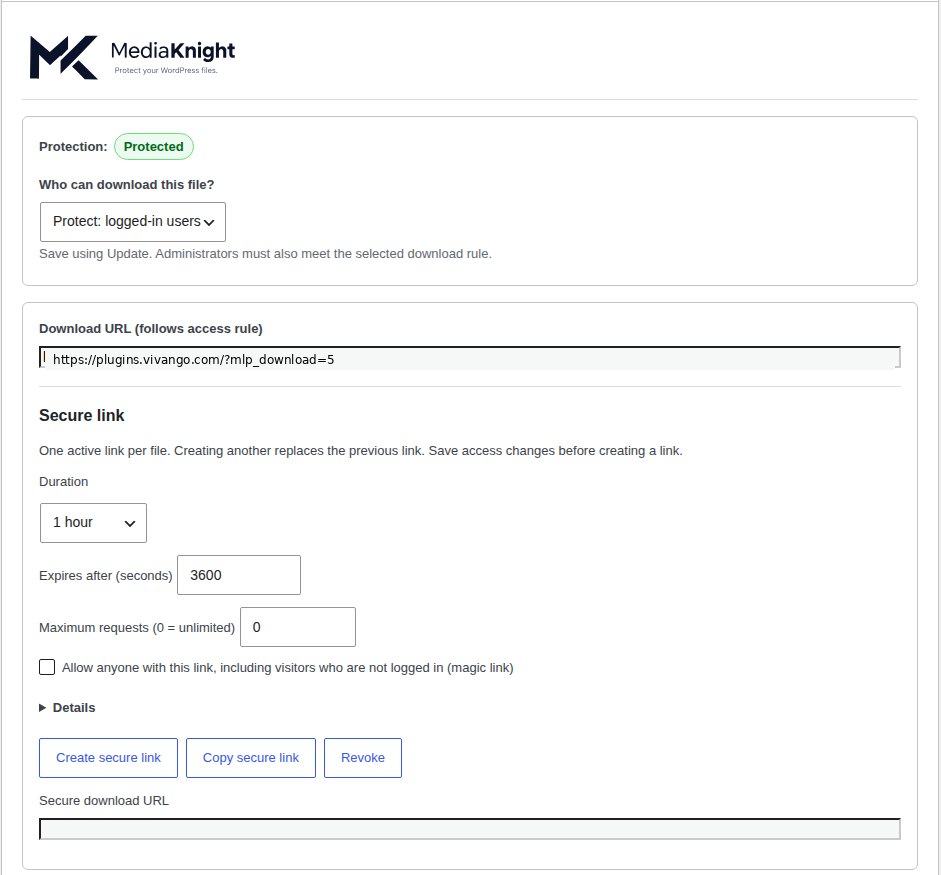
A file can still be reachable through its direct URL. MediaKnight controls access to the file itself, so hiding a page or its download button is not your only line of defence.
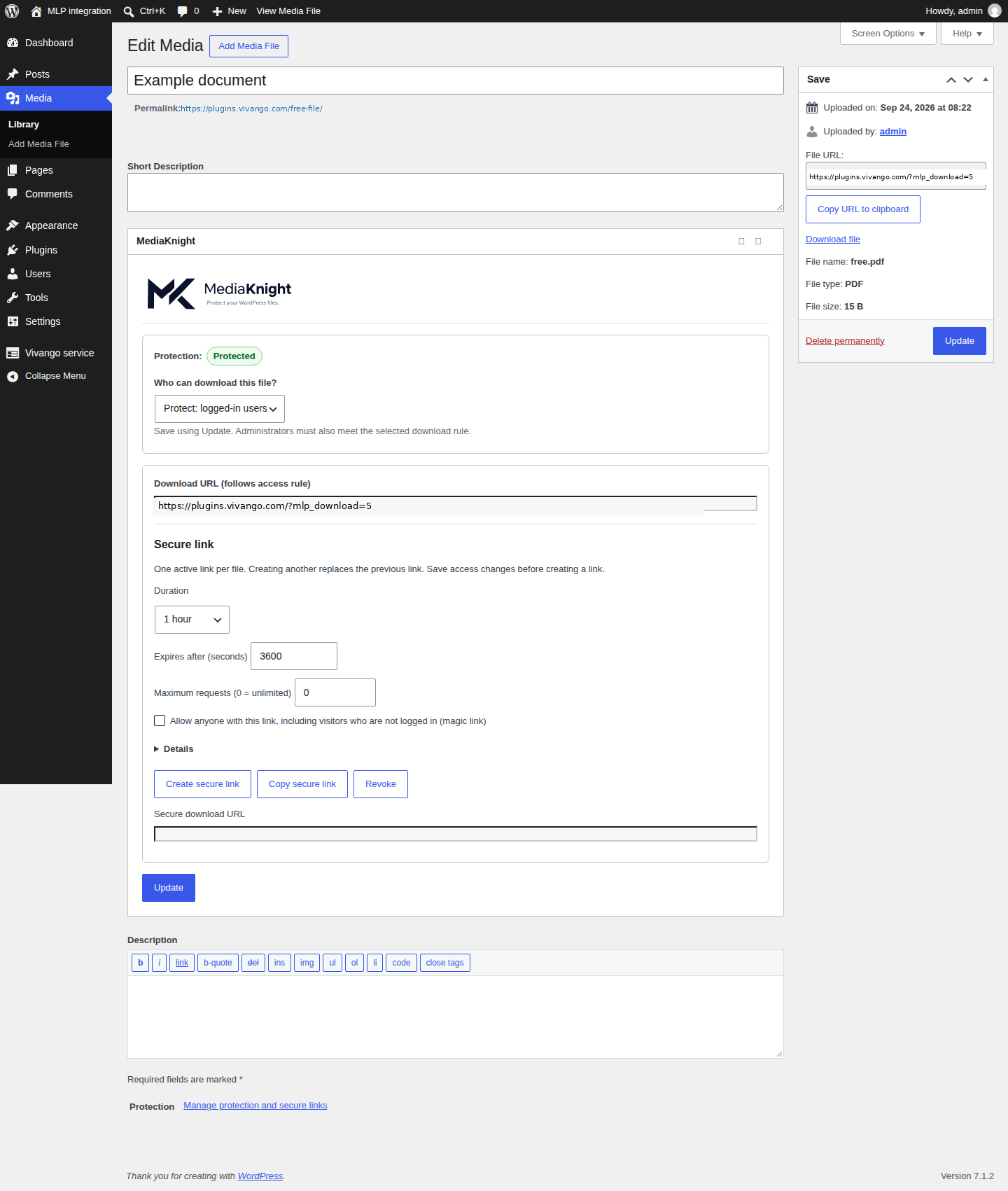
Make selected downloads available to logged-in WordPress users, rather than everyone with the original file URL.
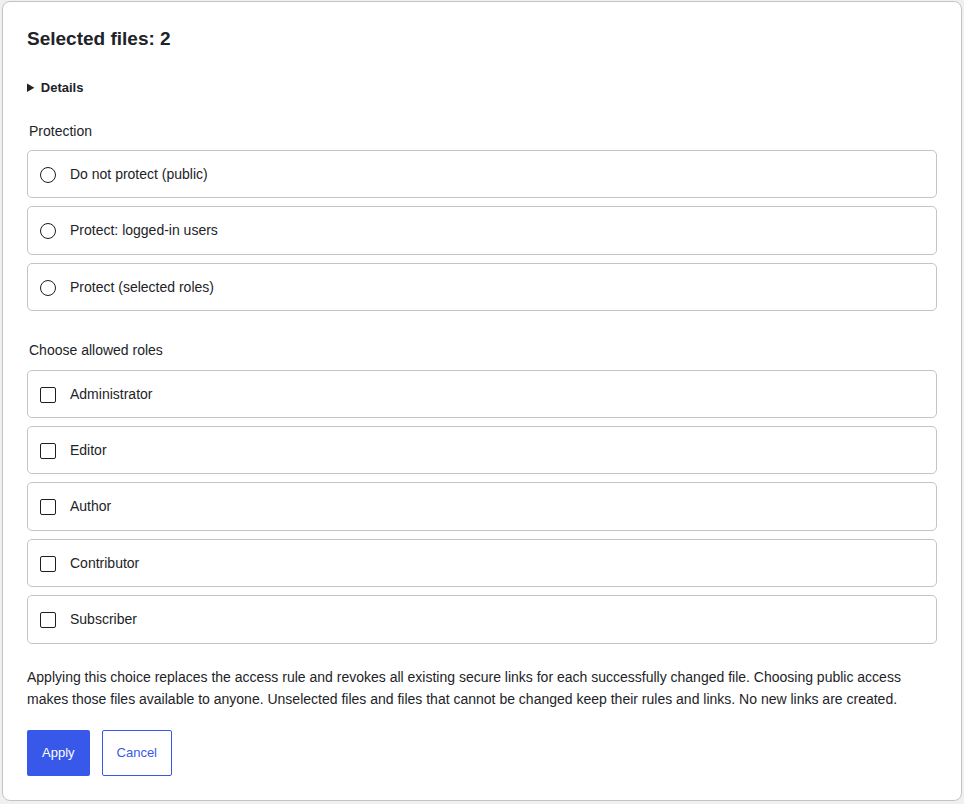
FREEChoose which WordPress roles can open a file. Apply the same protection to a selection in one deliberate bulk action.
PROCreate a time-limited link and revoke it when access is no longer needed. Anyone-with-the-link access is an explicit choice.
PROFAMILIAR WORDPRESS. LESS HANDWORK.
Upload as usual. Manage protection beside the file. With Pro, change a selection together or set the protection for new uploads once.
The bulk confirmation shows the selection and the consequences before applying a change. Files outside that selection keep their existing rules.
ONE USEFUL FREE PLUGIN. ONE PRO EXTENSION.
Choose Free for manual protection. Choose Pro for roles, automation and more control over sharing.
Protect individual files for logged-in users.
Ready to use without registration.
Protect more files with less repetitive work.
1 site · excluding VAT
By buying or activating Pro you agree to the license terms. Prices exclude VAT; the total is shown at checkout.
| What you can do | Free | Pro |
|---|---|---|
| Protect individual files for logged-in users | Included | Included |
| Create or change role-based access | Not included | Included |
| Apply protection to multiple selected files | Not included | Included |
| Set default protection for new uploads | Not included | Included |
| Create time-limited sharing links | Not included | Included |
| Keep previously saved protection when Pro ends | Included | Included |
Pro ending does not make protected files public. Keep the Free base active. If automatic protection was enabled, new uploads are stopped until Pro is restored or that setting is deliberately disabled.
YOUR FIRST PROTECTED FILE
No new storage service to learn. Start with the hosting check, then choose the access that fits the file.
WordPress 6.0+ · PHP 7.4+Works with WordPress 6.0+ and PHP 7.4+. For security and performance, keep WordPress and PHP up to date.
When available, install it from WordPress.org. Add the separate Pro extension only when you need its features.
Run the built-in protection check. Nginx requires configuration by your host. Exclude protected downloads from caches.
Protect a file in your Media Library. Open the direct URL while signed out and confirm that the intended users can still open it.
CLEAR EXPECTATIONS
Clear answers about access, hosting and Pro.
MediaKnight protects selected Media Library files so direct uploads URLs no longer work for visitors. Logged-in users can still open them. Free covers that; Pro adds roles, bulk protect, auto-protect new uploads, and expiring share links.
Apache: automatic rules when uploads are writable. Nginx: copy the generated snippet, have your host add it to the server block, then re-run the server protection check. No out-of-the-box claim without that rule.
Yes. Manual protect, logged-in access, server check and downloads stay free with no account, quota or expiry. Pro is a separate add-on.
MediaKnight Pro is €59 per year per website, excl. VAT. Try Pro for free — features and pricing: https://plugins.vivango.com/mediaknight/#plans
Saved protection rules stay in place. Role restrictions are not reset to all logged-in users. Files stay protected by Free.
No. MediaKnight controls file access using WordPress login, saved roles and signed links. It does not sell memberships, create a separate customer portal or give a unique private folder to each customer.
No. MediaKnight controls access to the file; it is not DRM. Someone who is authorised to open a file can still save or copy it. Previously public copies and caches need separate attention.
The download endpoint supports partial file requests for audio and video. It is not a streaming platform. Use unlimited link requests for media: a request limit counts file requests, not complete views. Link expiry, hosting and abuse protection can still affect playback.
The built-in check must confirm that direct file access can be blocked. Apache needs the appropriate rules to be honoured; Nginx needs host configuration. CDN or caching copies are not automatically erased.
Existing saved protection and access rules remain enforced by the Free base. Creating new Pro rules and links requires an active entitlement. If automatic protection was enabled, uploads pause rather than silently becoming public.
No. Your media files stay on your own hosting. The free protection features do not require a connection to Freemius. If you choose to connect in a version with the optional Pro integration, Freemius is used for the Pro trial or purchase, licence management and updates. Before connecting, review which site, account and technical data will be shared.
Yes. The 14-day trial is free, needs no payment card and never turns into a paid subscription automatically.
Yes. MediaKnight’s separate Flexible refund policy gives consumers and business customers a full refund within 14 days of the first purchase, including after Pro has been used. This is separate from the statutory withdrawal right, which may end after express consent to immediate activation. Request the refund in the Freemius customer portal or email support@vivango.com.
Vivango makes MediaKnight and provides the licence, support and updates. Pro is sold through our authorised reseller Freemius, Inc., which handles payment and VAT and sends the invoice.
No plugin can guarantee that. MediaKnight limits access to files in your uploads folder, but it cannot control copies already in a CDN or cache, or server rules it cannot write (on Nginx your host must apply them). Run the built-in server check after every server change and keep your own backups.
Email support@vivango.com. For a licence move, write from your new address and include your licence key or order number; we move it after a check.
Pro keeps working. Change your email address on the MediaKnight account page in WordPress or in the customer portal. If that does not work, email support@vivango.com from your new address with your license key or order number; we will move the license after verifying ownership.
AVAILABILITY
Available now.

A question about whether MediaKnight fits your site?
Email VivangoOpens your email app.
Read our privacy policy, terms of sale and right of withdrawal (with the withdrawal form), or contact us at support@vivango.com. The page uses no analytics, external fonts or marketing trackers.